> ## Documentation Index
> Fetch the complete documentation index at: https://apidocs.mossx.ai/llms.txt
> Use this file to discover all available pages before exploring further.

# DeepSeek Harness 配置

DeepSeek Harness 后续简称DSH

### **一. 安装** DSH

访问 DSH 官网，根据官网教程来安装：[https://www.deepseek.com/harness/](https://www.deepseek.com/harness/)

### 启动DSH

```text theme={null}
npx @deepseek-ai/dsh web
```

启动后默认会在：[http://127.0.0.1:3080/](http://127.0.0.1:3080/) ，浏览器访问这个网址

***

### **第二步：配置  CC GUI 中转站信息**

访问密钥管理页面：[https://fufei.mossx.ai/keys](https://fufei.mossx.ai/keys)

点击 密钥右侧的 使用教程：

<Frame>
  <img src="https://mintcdn.com/docs-api/6NgVxoDfugWH9dMI/images/ScreenShot_2026-08-21_130312_429.png?fit=max&auto=format&n=6NgVxoDfugWH9dMI&q=85&s=5d559e5cdd343d8d6ed974db4211f01f" alt="Screen Shot 2026 08 21 130312 429" width="2784" height="200" data-path="images/ScreenShot_2026-08-21_130312_429.png" />
</Frame>

下面以配置Grok举例，其实都互通的

注意记住两个信息：

* URL
* Key

Grok 配置举例，这个密钥，就是 [https://fufei.mossx.ai/keys](https://fufei.mossx.ai/keys) 你创建的密钥
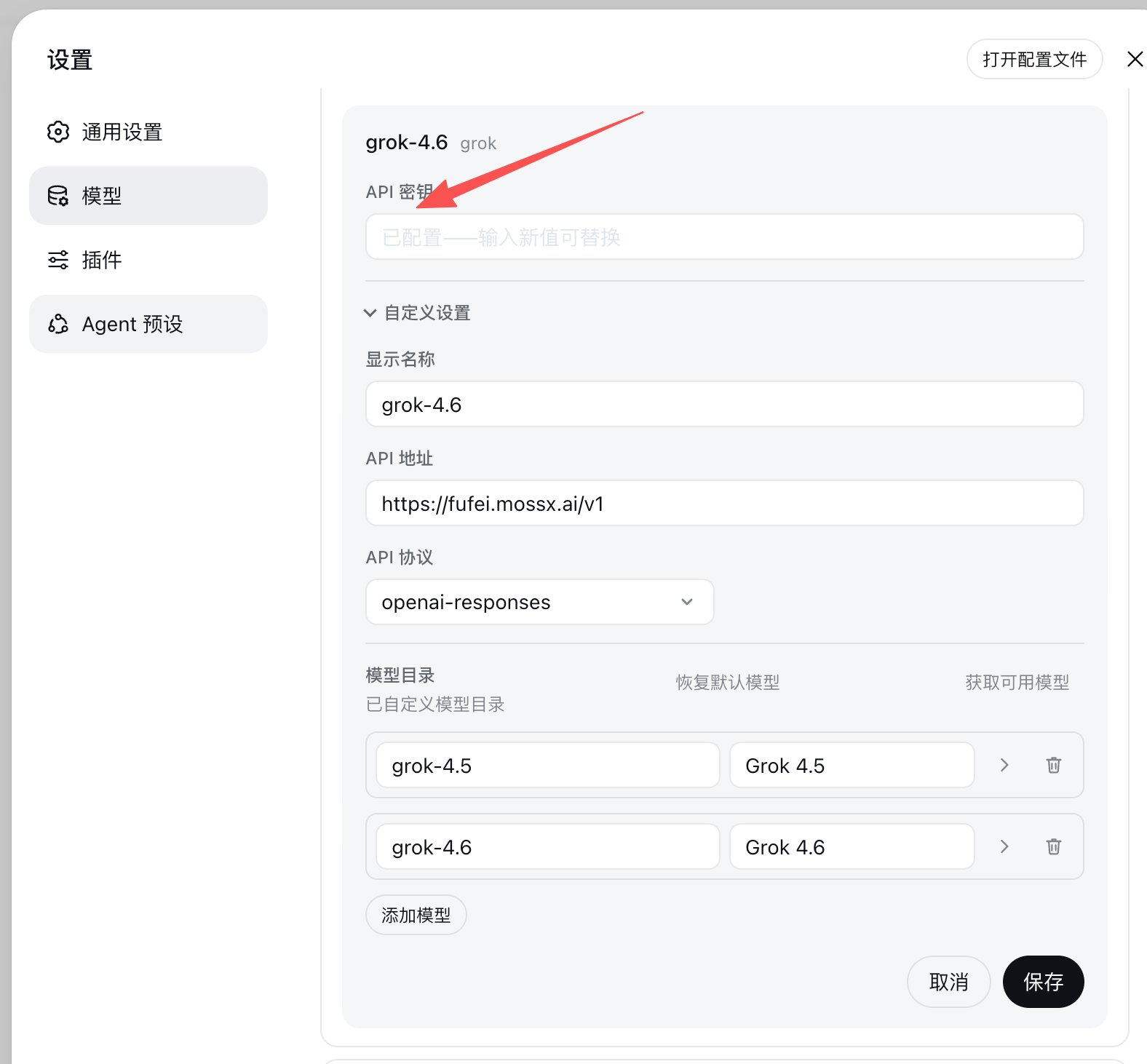
<Frame>
  <img src="https://mintcdn.com/docs-api/6NgVxoDfugWH9dMI/images/ScreenShot_2026-08-21_131156_740.png?fit=max&auto=format&n=6NgVxoDfugWH9dMI&q=85&s=59bfa17d2b1f9792ea69e025408283ff" alt="Screen Shot 2026 08 21 131156 740" width="1576" height="1462" data-path="images/ScreenShot_2026-08-21_131156_740.png" />
</Frame>

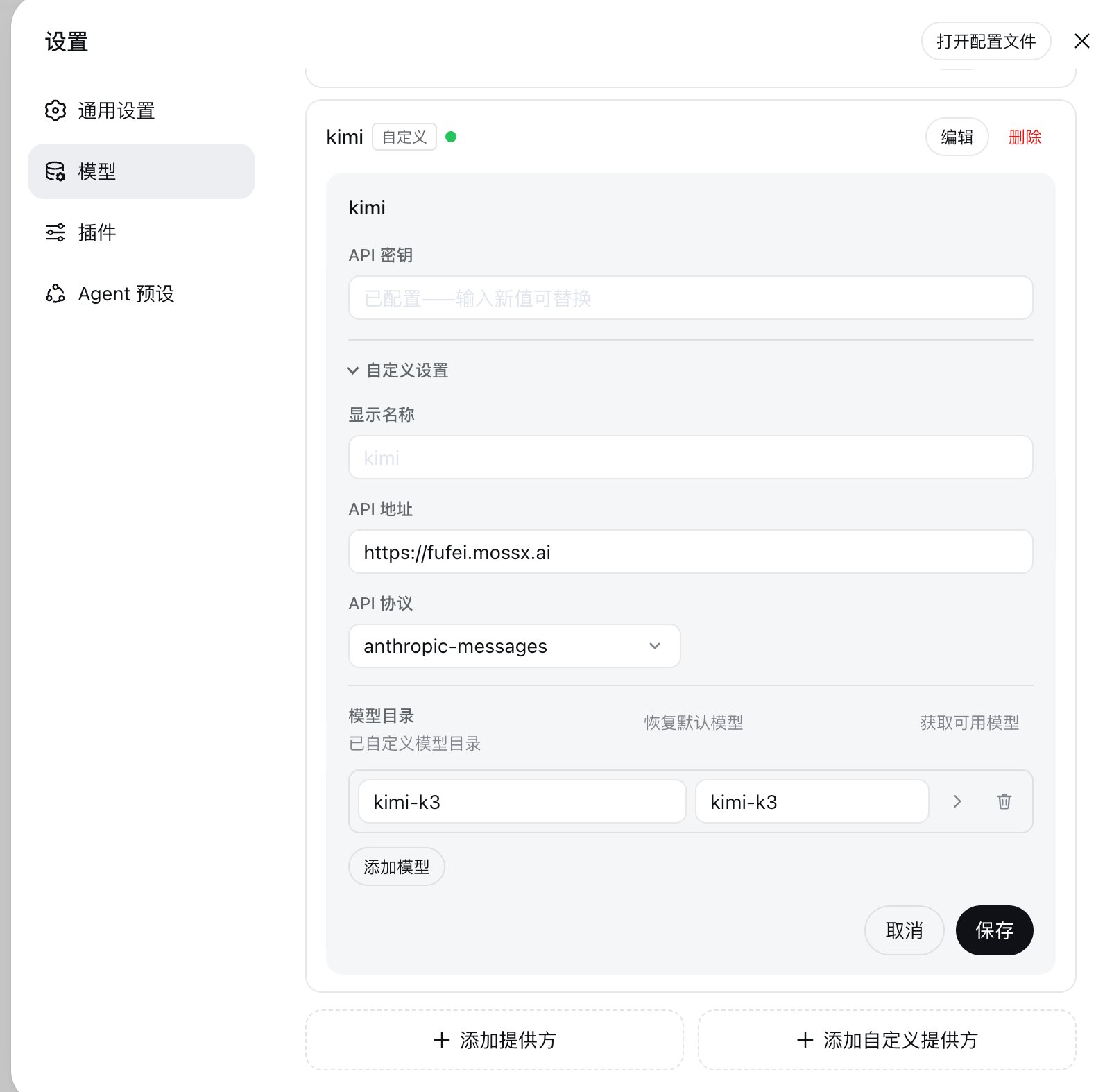
Kimi配置举例

<Frame>
  <img src="https://mintcdn.com/docs-api/6NgVxoDfugWH9dMI/images/ScreenShot_2026-08-21_131206_460.png?fit=max&auto=format&n=6NgVxoDfugWH9dMI&q=85&s=42eadecaed7678e947fd4ff7049d236e" alt="Screen Shot 2026 08 21 131206 460" width="1580" height="1574" data-path="images/ScreenShot_2026-08-21_131206_460.png" />
</Frame>